
Privacy & Trusted Sites
Mise is engineered to provide strong privacy defaults while ensuring that modern web applications, banking portals, and checkout flows work without artificial roadblocks.
Native Tracker & Ad Blocking
Mise integrates an in-process network request blocker powered by Ghostery's block engine:
- Blocks known marketing trackers, advertising networks, and telemetry collectors natively before outbound network requests leave the browser.
- Operates at the network intercept layer, conserving CPU cycles and network bandwidth on slow or metered connections.
- Requires no external extensions or third-party web store plugins.
Global Private Browsing (Ctrl + Shift + P)
For volatile browsing sessions where no trace should remain:
- Press Ctrl + Shift + P to toggle Private Browsing Mode.
- All new navigation routes through an in-memory profile partition (
MisePrivateProfile). - Cookies, cache files, and site storage created during private mode are wiped completely when the session ends or when the browser closes.
Fingerprint Protection & Farbling
Mise actively protects against passive browser fingerprinting:
- User Agent Standardisation: Strips internal Electron and Mise application tokens from HTTP headers and JavaScript
navigatorproperties (userAgent,appVersion, anduserAgentDataclient hints), matching a clean Chromium release. - Canvas & WebGL Farbling: Applies subtle, imperceptible noise to Canvas data exports (
toDataURL,toBlob,getImageData) and rotates WebGL extension order. Fingerprinting auditors such as EFF Cover Your Tracks recognise this as a randomised, non-trackable fingerprint. - Hardware Profile Masking: Standardises
hardwareConcurrency(8 cores),deviceMemory(8 GB), and WebGL unmasked vendor/renderer to a common Brave/Chromium baseline to blend into large anonymity pools. - Trusted Domains Exemption: Any domain added to Trusted Sites automatically bypasses farbling, ensuring sensitive fraud-detection checks (like banking) see consistent device metrics.
Trusted Sites (Online Banking & Shopping)
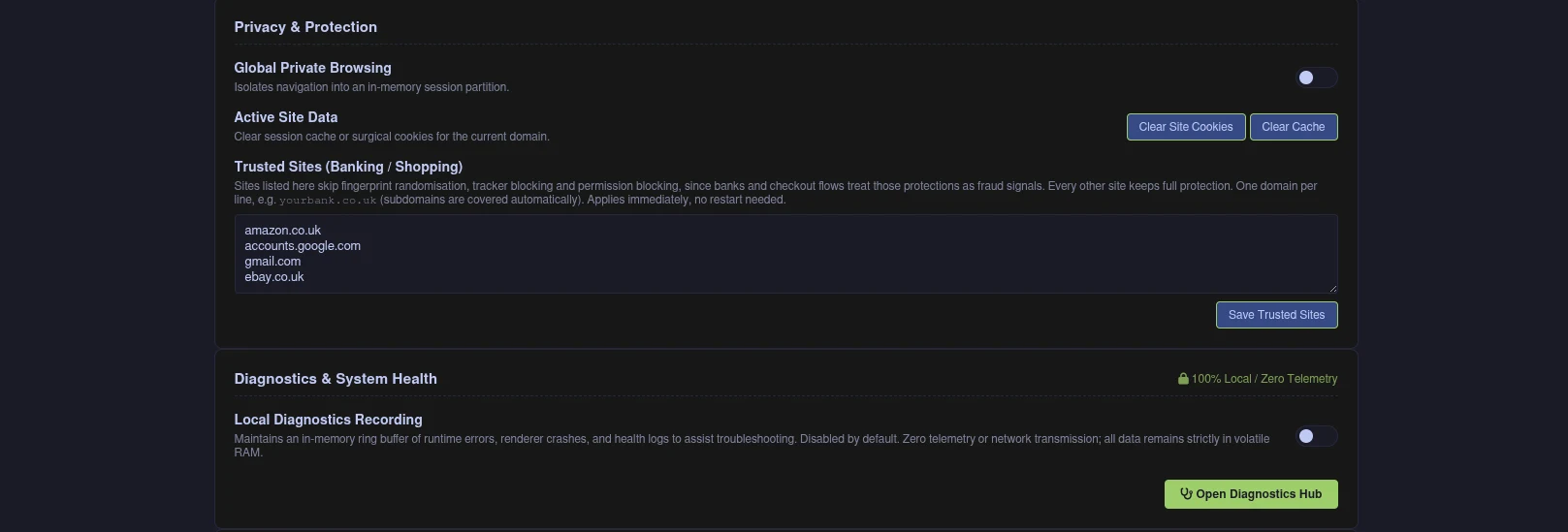
Modern online banks, Google authentication, and e-commerce sites (such as Amazon or checkout payment gateways) employ sophisticated anti-fraud algorithms. When a browser randomises fingerprints, alters user-agent client hints, or strips verification headers, fraud systems flag the session as suspicious and block logins or payments.
Mise resolves this through the Trusted Sites architecture:
- Shield Indicator: Every tab in the vertical sidebar features a shield button.
- Shield Active (Half Shield): Full protection, tracker blocking, and strict isolation are active.
- Shield Down (Full Shield): The domain is in your Trusted Sites list. Fraud detection signals are kept intact to ensure seamless logins and payment processing.
- One-Click Whitelisting: Click the shield icon in any sidebar tab to toggle trust status for that domain immediately. Mise updates your configuration and reloads the tab.
- Managing Trusted Domains: In Preferences (F1 or Ctrl + H), open the Trusted Sites text area. Enter one domain per line (e.g.
amazon.co.uk,accounts.google.com). All subdomains are covered automatically without requiring a browser restart.
Active Site Data Clearing
When debugging web applications or purging lingering sessions:
- Open Preferences (F1 or Ctrl + H) and navigate to Privacy & Protection.
- Clear Site Cookies: Surgically deletes cookies specifically matching the active tab's domain without logging you out of unrelated sites in other tabs.
- Clear Cache: Flushes the local Chromium disk and memory cache.