
Configuration Files
All Mise configurations are stored in standard JSON and Markdown format within your user profile directory:
text
~/.config/mise-browser/1. Engine & Preferences (config.json)
Controls hardware switches, process limits, privacy whitelists, and search preferences:
json
{
    "disable_gpu": false,
    "background_throttling": true,
    "process_limit": 1,
    "tab_sleep_timeout_minutes": 15,
    "sidebar_auto_collapse": true,
    "show_status_bar": true,
    "email_handler": "system",
    "search_engine": "https://duckduckgo.com/?q=%s",
    "spellchecker_language": "en-GB",
    "theme": "dark",
    "webview_theme": "dark",
    "theme_colors": {
        "dark": {
            "accent": "#7aa2f7",
            "bg_main": "#1a1b26",
            "bg_sidebar": "#16161e",
            "text": "#c0caf5",
            "sidebar_opacity": 100,
            "overlay_opacity": 100
        },
        "light": {
            "accent": "#2b59c3",
            "bg_main": "#e5e5e5",
            "bg_sidebar": "#d4d4d4",
            "text": "#1a1a1a",
            "sidebar_opacity": 100,
            "overlay_opacity": 100
        }
    },
    "trusted_domains": [
        "x.com",
        "amazon.co.uk",
        "accounts.google.com",
        "google.com"
    ]
}
Options Description
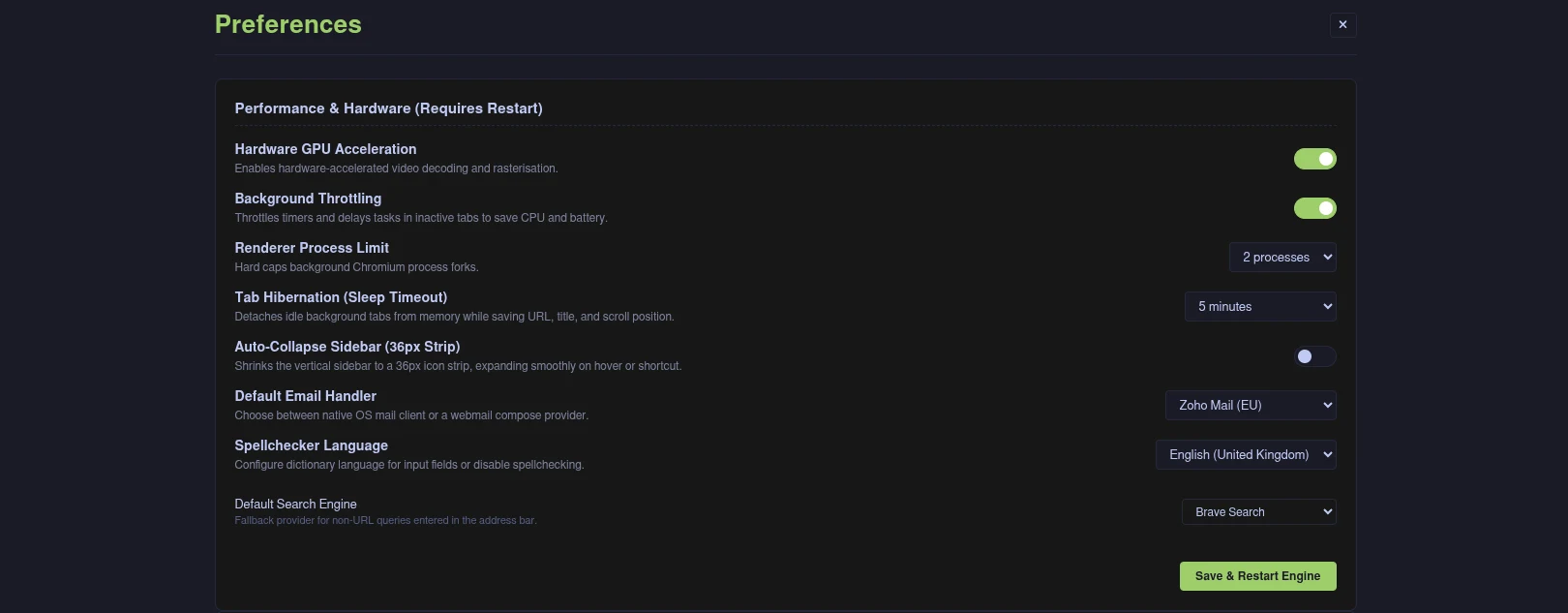
disable_gpu: Set totrueto disable hardware GPU acceleration on systems with problematic graphics drivers.background_throttling: Throttles timers and delays tasks in background tabs to conserve CPU cycles.process_limit: Hard cap on Chromium renderer process forks (1 to 5).tab_sleep_timeout_minutes: Inactivity timeout before background tabs detach and hibernate (5, 15, 30, 60, or 0 to disable).sidebar_auto_collapse: Whentrue, collapses the vertical sidebar into a 36px icon strip, expanding smoothly on hover or via shortcut.show_status_bar: Whentrue, displays the 22px footer status bar with modal state, real-time link hover preview, and TLS security status.email_handler: Choose betweensystem(OS defaultmailto:) or webmail providers (Gmail, Zoho, Outlook, Fastmail, ProtonMail).search_engine: Fallback search provider URL when non-URL queries are entered without an alias.spellchecker_language: Dictionary language used for input spellchecking (e.g.en-GB,en-US,en-CA,en-AU,cs,de,fr,es,it,pt,nl,pl, ordisabled).theme: Interface theme preference (darkfor Tokyo Night orlight).webview_theme: Website native theme preference (darkorlight), toggled via the sidebar theme button.theme_colors: Custom visual colour palette and opacity settings per theme mode:
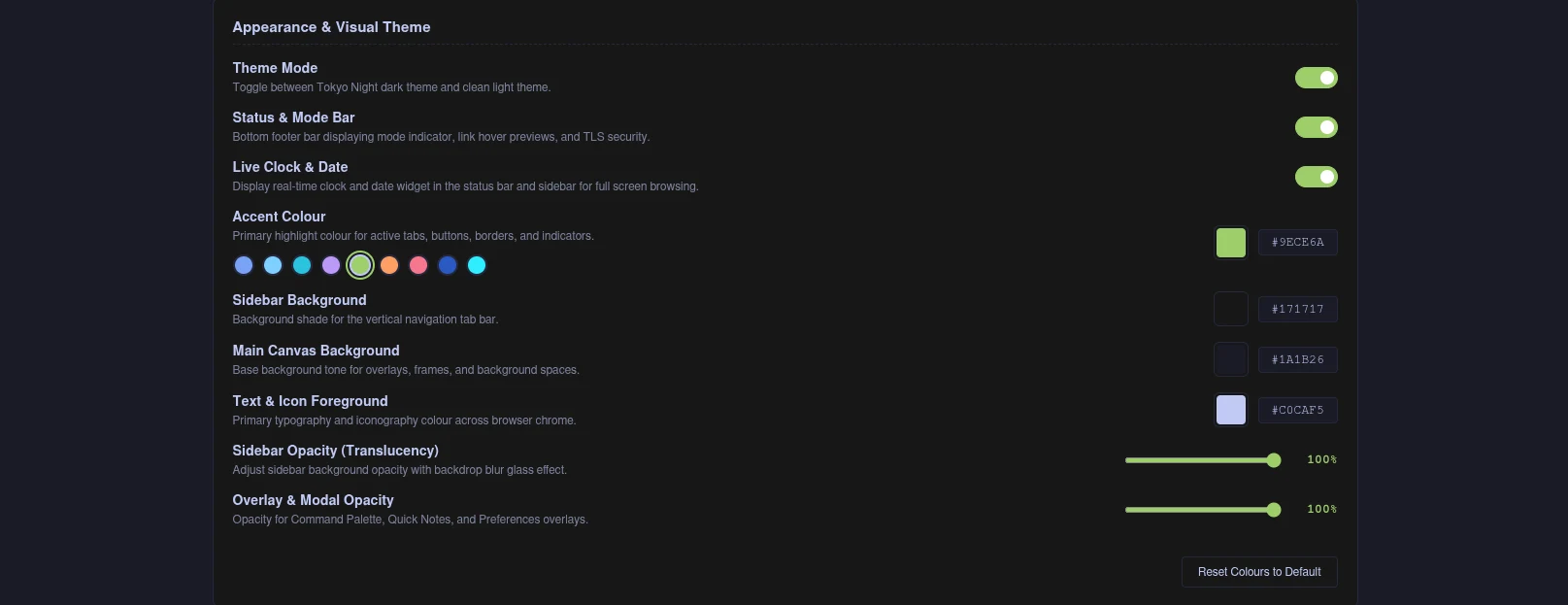
accent: Primary highlight colour for active tabs, borders, and controls (defaults to#7aa2f7in dark,#2b59c3in light).bg_main: Base window and modal canvas background colour.bg_sidebar: Vertical sidebar background colour.text: Primary text and icon foreground colour.sidebar_opacity: Sidebar background translucency percentage (40% to 100%) with backdrop blur glass effect.overlay_opacity: Modal and overlay translucency percentage (50% to 100%) for Command Palette, Notes, and Preferences.trusted_domains: Array of domains exempted from tracker blocking and fingerprint spoofing.
2. Keybindings Map (keybinds.json)
Maps internal browser actions to custom keystroke combinations. See the Keyboard Shortcuts Reference for the complete list of action names.
3. Session State (session.json)
Maintains persistent workspaces, URLs, titles, and sleeping tab scroll offsets:
json
{
    "current_workspace": "Work",
    "workspaces": {
        "Work": [
            "https://github.com/notifications"
        ],
        "Personal": [
            "https://news.ycombinator.com"
        ]
    },
    "tab_titles": {
        "Work": ["Notifications"],
        "Personal": ["Hacker News"]
    },
    "tab_sleep_states": {
        "Personal": [
            {
                "url": "https://news.ycombinator.com",
                "title": "Hacker News",
                "scrollX": 0,
                "scrollY": 840,
                "hibernatedAt": 1727299000000
            }
        ]
    }
}
4. Bookmarks & Quickmarks
bookmarks.json: An array of saved bookmark objects containingtitle,url, and creation timestamp.quickmarks.json: A key-value dictionary mapping single alphanumeric keys to URLs (e.g."g": "https://github.com").
5. Quick Notes (notes.md)
A standard Markdown file storing everything typed into the Quick Notes overlay (Ctrl + N). You can edit this file directly using your favourite text editor.