
Keyboard Shortcuts Reference
All keyboard shortcuts in Mise Browser are fully customisable via ~/.config/mise-browser/keybinds.json.
Default Shortcut Bindings
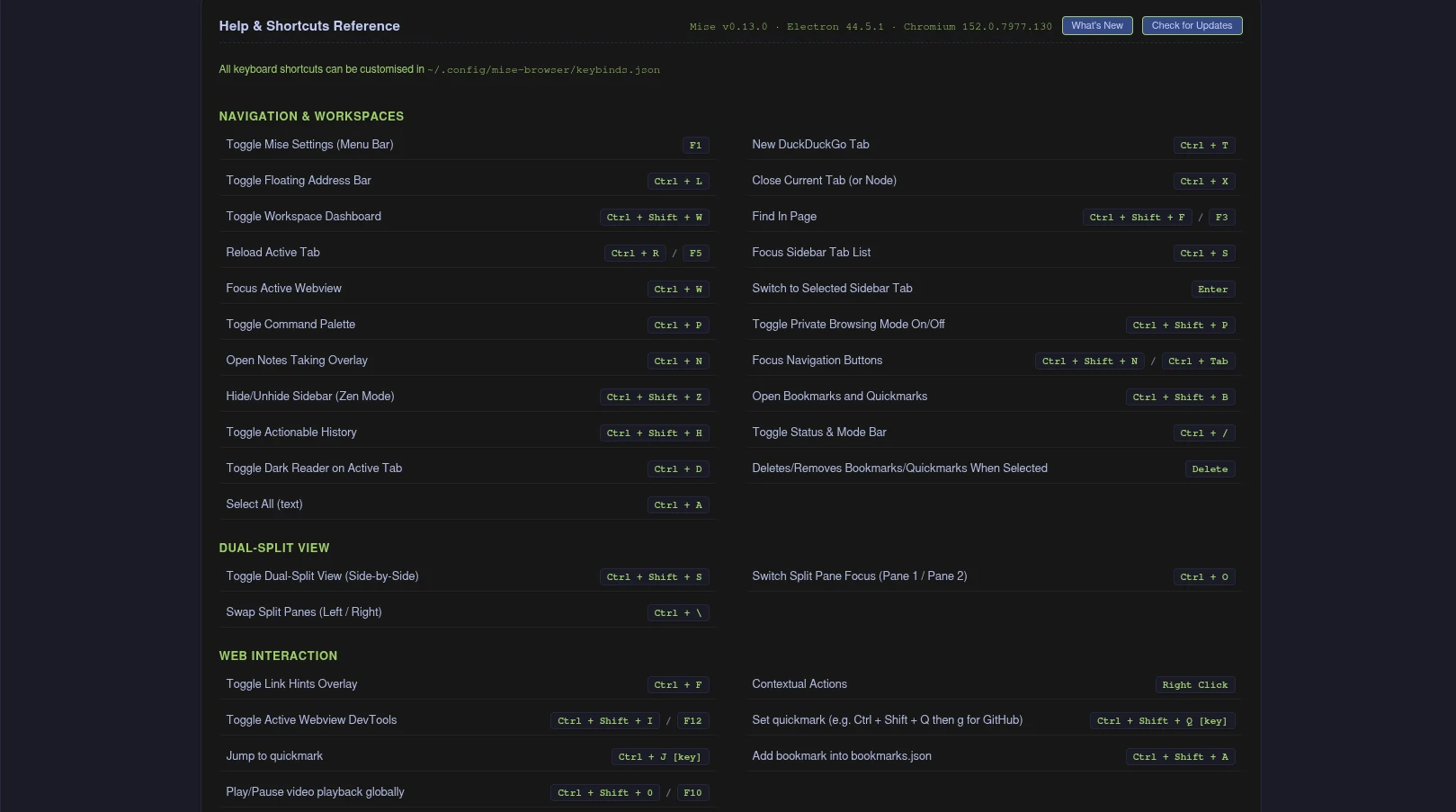
Navigation & Workspaces
| Shortcut | Action | Description |
|---|---|---|
| F1 | toggle-menu-bar | Toggles the Mise Settings and Menu Bar |
| Ctrl + T | spawn-tab | Opens a new blank tab (defaults to configured search engine) |
| Ctrl + L | toggle-address | Opens the floating address bar overlay |
| Ctrl + X | remove-tab | Closes the currently active tab or selected dashboard node |
| Ctrl + Shift + W | toggle-dashboard | Opens the Workspace Dashboard tree overlay |
| Ctrl + Shift + F / F3 | toggle-find | In-page text search overlay across active webview content |
| Ctrl + R / F5 | reload-active-tab | Reloads the active tab |
| Ctrl + S | focus-sidebar | Moves focus to the vertical tab sidebar (cycles between tabs and navigation buttons) |
| Ctrl + Shift + N | focus-nav-buttons | Moves focus directly to navigation action buttons |
| Ctrl + Tab | focus-nav-buttons | Secondary shortcut to focus navigation action buttons |
| Ctrl + W | focus-webview | Moves focus directly into the active web page |
| Ctrl + Shift + Z | toggle-zen-mode | Toggles sidebar expansion or pin mode |
| Ctrl + P | toggle-palette | Opens the Command Palette |
| Ctrl + Shift + P | toggle-private-mode | Toggles volatile in-memory private browsing mode |
| Ctrl + H | toggle-help | Opens the Preferences and settings overlay |
| Ctrl + N | toggle-notes | Opens the Markdown quick-notes overlay |
| Ctrl + Shift + B | toggle-bookmarks | Opens the Bookmarks and Quickmarks overlay |
| Ctrl + Shift + H | toggle-history | Opens the Actionable History overlay |
| Ctrl + Shift + D | toggle-downloads | Toggles the native download shelf |
| Ctrl + / | toggle-status-bar | Toggles the bottom status and mode footer bar |
| Ctrl + Shift + S | toggle-split | Toggles dual split view (1x2 side by side comparison) |
| Ctrl + O | switch-split-focus | Cycles keyboard focus between split pane 1 and pane 2 |
| Ctrl + \ | swap-split-panes | Swaps the positions of pane 1 and pane 2 |
Web Interaction & Power Tools
| Shortcut | Action | Description |
|---|---|---|
| Ctrl + F | trigger-hints | Toggles Link Hints overlay for mouse-free clicking |
| Ctrl + D | toggle-dark-reader | Toggles Dark Reader high-contrast dark theme on active tab |
| F9 | toggle-reader-view | Toggles Native Reader View (distilled readable article format) |
| Ctrl + Shift + Q [key] | set-quickmark | Binds current page URL to any single key |
| Ctrl + J [key] | jump-quickmark | Jumps instantly to the URL bound to that key |
| Ctrl + Shift + A | add-bookmark | Saves the current tab into bookmarks.json |
| Ctrl + Shift + 0 | toggle-global-media | Plays or pauses media playback globally |
| F10 | toggle-global-media | Secondary global media play/pause binding |
| Ctrl + Shift + I | toggle-devtools | Opens Chromium DevTools in a dedicated window |
| F12 | toggle-devtools | Secondary shortcut for DevTools |
Modal Navigation (NORMAL Mode)
When viewing web content without an active text field or prompt, Mise operates in NORMAL Mode, allowing Vim-style single-key navigation without modifier chords:
| Key | Description |
|---|---|
j / k | Smooth scroll down / up (80px) |
d / u | Half-page smooth scroll down / up |
h / l | Smooth scroll left / right (80px) |
gg | Jump to top of page |
G | Jump to bottom of page |
t | Open new tab |
x | Close current tab |
o | Open floating address bar |
r / R | Reload / Force reload current tab |
H / L | History back / History forward |
/ | In-page text search |
f | Trigger Link Hints overlay |
e | Toggle Native Reader View |
w | Open Workspace Dashboard |
s | Focus sidebar tab list |
y | Copy current page URL to clipboard |
i | Enter INSERT mode |
Escape | Blur active input field and return to NORMAL mode |
Shift + Escape | Toggle PASSTHROUGH mode (sends raw keys to web applications) |
Customising Shortcuts (keybinds.json)
Keybindings are decoupled from source code and managed by keybinds.js. You can customise any shortcut by editing:
text
~/.config/mise-browser/keybinds.jsonExample Custom Configuration
json
{
  "spawn-tab": "Ctrl+T",
  "toggle-address": "Ctrl+O",
  "remove-tab": ["Ctrl+W", "Ctrl+D", "Ctrl+Q"],
  "focus-sidebar": "Alt+M",
  "focus-webview": "Alt+B",
  "trigger-hints": "Ctrl+F",
  "toggle-zen-mode": "F11"
}- Modifiers: Use
Ctrl,Alt,Shift, orMetacombined with+. - Multiple Bindings: Assign an array of strings to bind multiple shortcuts to the same action (e.g.
["Ctrl+W", "Ctrl+D"]). - Reloading: Customisations apply immediately upon restarting Mise, or automatically when modifying bindings via the internal configuration bridge.